To toggles between simple and advance button in form ......
in simple buttton clicked method -----------------
void clicked()
{
super();
element.toggelSimpleAdvanced(!advanced);
}
in advance buttton clicked method -----------------
void clicked()
{
super();
element.toggelSimpleAdvanced(!advanced);
}
void toggelSimpleAdvanced(boolean _advanced = advanced)
{
element.lock();
advanced = _advanced;
if (!advanced)
{
TabTable.showTabs (false);
TabLine.showTabs (false);
TabTableSimple.visible (true);
TabtableOverview.visible (false);
TabTableGeneral.visible (false);
TabTableSetup.visible (false);
TabTableDelivery.visible (false);
TabTableFrom.visible (false);
TabTableTo.visible (false);
TabLineOverview.visible (true);
TabLineGeneral.visible (true);
TabLineSetup.visible (true);
TabLineQuantityShipNow.visible (true);
TabLineQuantityReceiveNow.visible (true);
TabLineDimension.visible (true);
//tabLineDimension.visible (false);
ButtonToggleSimple.visible (true);
ButtonToggleAdvance.visible (false);
TabTable.tab(2);
TabLine.tab(1);
}
else
{
TabTable.showTabs (true);
TabLine.showTabs (true);
TabTableSimple.visible (false);
TabtableOverview.visible (true);
TabTableGeneral.visible (true);
TabTableSetup.visible (true);
TabTableDelivery.visible (true);
TabTableFrom.visible (true);
TabTableTo.visible (true);
TabLineOverview.visible (true);
TabLineGeneral.visible (true);
TabLineSetup.visible (true);
TabLineQuantityShipNow.visible (true);
TabLineQuantityReceiveNow.visible (true);
TabLineDimension.visible (true);
ButtonToggleSimple.visible (false);
ButtonToggleAdvance.visible (true);
TabTable.tab(1);
}
element.resetSize();
element.unLock();
if (advanced)
AdvancedTransferTable_TransferId.setFocus();
else
InventTransferTable_TransferId.setFocus();
}
in form init method add this code
advanced = true;
element.toggelSimpleAdvanced();
inventtransfertable_ds.refresh();
inventtransfertable_ds.reread();
inventtransfertable_ds.research();
Tuesday, March 8, 2016

To print the Report from the form
On the Button Clicked method:
void clicked()
{
Args args = new args();
ReportRun reportRun;
report r;
//SysQueryRun sysqueryrun;
;
args.parm(inventtransfertable.TransferId);
args.name(reportstr(BranchOrderRequistion));
reportRun = new reportRun(args);
reportRun = classFactory.reportRunClass(args);
reportRun.suppressReportIsEmptyMessage(false);
reportRun.query().interactive(false);
r = reportrun.report();
r.query().interactive(false);
reportrun.init();
reportrun.run();
// super(); /// disable the error code(Object 'ReportRun' could not be created in ax 2009).
}
And then on the init method on the report;
public void init()
{
Args args = new args();
ReportRun reportrun;
if(element.args().parm())
{
this.query().dataSourceTable(tablenum(inventtransfertable))
.addRange(fieldnum(inventtransfertable, TransferId)).value(element.args().parm());
// this.query().userUpdate(false);
this.query().interactive(false); // disables query prompt
this.report().interactive(false); // disables report promt(printer setting)
}
else
{
//args.parm(inventtransfertable.TransferId);
//args.name(reportstr(BranchOrderRequistion));
reportrun = new ReportRun(args);
reportrun.query().interactive(false);
// reportrun.init();
// reportrun.run();
}
this.printJobSettings().suppressScalingMessage(true); //disables page size window
// super();
}
On the Button Clicked method:
void clicked()
{
Args args = new args();
ReportRun reportRun;
report r;
//SysQueryRun sysqueryrun;
;
args.parm(inventtransfertable.TransferId);
args.name(reportstr(BranchOrderRequistion));
reportRun = new reportRun(args);
reportRun = classFactory.reportRunClass(args);
reportRun.suppressReportIsEmptyMessage(false);
reportRun.query().interactive(false);
r = reportrun.report();
r.query().interactive(false);
reportrun.init();
reportrun.run();
// super(); /// disable the error code(Object 'ReportRun' could not be created in ax 2009).
}
And then on the init method on the report;
public void init()
{
Args args = new args();
ReportRun reportrun;
if(element.args().parm())
{
this.query().dataSourceTable(tablenum(inventtransfertable))
.addRange(fieldnum(inventtransfertable, TransferId)).value(element.args().parm());
// this.query().userUpdate(false);
this.query().interactive(false); // disables query prompt
this.report().interactive(false); // disables report promt(printer setting)
}
else
{
//args.parm(inventtransfertable.TransferId);
//args.name(reportstr(BranchOrderRequistion));
reportrun = new ReportRun(args);
reportrun.query().interactive(false);
// reportrun.init();
// reportrun.run();
}
this.printJobSettings().suppressScalingMessage(true); //disables page size window
// super();
}
Update_record set
This method is used to update the records in table........(and copies the record from one field to another with in a table)
static void update_recordset(Args _args)
{
inventtrans inventtrans;
ttsBegin;
update_recordset inventtrans
setting InventTransaction = inventtrans.Qty
where inventtrans.transtype == inventtranstype::InventTransaction;
update_recordset inventtrans
setting TransferOrderReceive = inventtrans.Qty
where inventtrans.transtype == inventtranstype::TransferOrderReceive;
update_recordset inventtrans
setting purch = inventtrans.Qty
where inventtrans.transtype == inventtranstype::purch;
update_recordset inventtrans
setting InventCounting = inventtrans.Qty
where inventtrans.transtype == inventtranstype::InventCounting;
update_recordset inventtrans
setting sales = inventtrans.qty
where inventtrans.transtype == inventtranstype::sales;
update_recordset inventtrans
setting TransferOrderShip = inventtrans.Qty
where inventtrans.transtype == inventtranstype::TransferOrderShip;
ttsCommit;
}
This method is used to update the records in table........(and copies the record from one field to another with in a table)
static void update_recordset(Args _args)
{
inventtrans inventtrans;
ttsBegin;
update_recordset inventtrans
setting InventTransaction = inventtrans.Qty
where inventtrans.transtype == inventtranstype::InventTransaction;
update_recordset inventtrans
setting TransferOrderReceive = inventtrans.Qty
where inventtrans.transtype == inventtranstype::TransferOrderReceive;
update_recordset inventtrans
setting purch = inventtrans.Qty
where inventtrans.transtype == inventtranstype::purch;
update_recordset inventtrans
setting InventCounting = inventtrans.Qty
where inventtrans.transtype == inventtranstype::InventCounting;
update_recordset inventtrans
setting sales = inventtrans.qty
where inventtrans.transtype == inventtranstype::sales;
update_recordset inventtrans
setting TransferOrderShip = inventtrans.Qty
where inventtrans.transtype == inventtranstype::TransferOrderShip;
ttsCommit;
}
//To find out stock in inventsum using code X++:
static void ItemOnhandSum(Args _args)
{
InventSum inventsum;
Qty availableQty = 0;
;
select sum(PostedQty),
sum(Received),
sum(Deducted),
sum(Registered),
sum(Picked),
sum(ReservPhysical),
sum(Ordered),
sum(Arrived),
sum(ReservOrdered),
sum(OnOrder) from inventsum
where inventsum.ItemId == "ws-p6";
if (inventsum)
{
availableQty = inventsum.PostedQty
+ inventsum.Received
- inventsum.Deducted
+ inventsum.Registered
- inventSum.Picked
- inventSum.ReservPhysical
+ inventsum.Ordered
+ inventsum.Arrived
- inventsum.ReservOrdered
- inventsum.OnOrder;
}
info(strfmt('%1', availableQty));
}
static void ItemOnhandSum(Args _args)
{
InventSum inventsum;
Qty availableQty = 0;
;
select sum(PostedQty),
sum(Received),
sum(Deducted),
sum(Registered),
sum(Picked),
sum(ReservPhysical),
sum(Ordered),
sum(Arrived),
sum(ReservOrdered),
sum(OnOrder) from inventsum
where inventsum.ItemId == "ws-p6";
if (inventsum)
{
availableQty = inventsum.PostedQty
+ inventsum.Received
- inventsum.Deducted
+ inventsum.Registered
- inventSum.Picked
- inventSum.ReservPhysical
+ inventsum.Ordered
+ inventsum.Arrived
- inventsum.ReservOrdered
- inventsum.OnOrder;
}
info(strfmt('%1', availableQty));
}
//Job for generating alerts -
void sendAlerts(EmplId _emplId, str _bodyMsg, ProjId _projId)
{
EventNotificationSync alert;
MenuFunction MenuFunction;
str dataSourceName;
;
dataSourceName = tablestr(inventtransfertable);
MenuFunction = new MenuFunction(menuitemdisplaystr(inventtransferorder), MenuItemType::Display);
alert = EventNotificationsync::newInfo('Order Availability',
_bodyMsg,
'hiiiiii',
NoYes::Yes,
curext(),
ProjTable::find(_ProjId),
dataSourceName,
MenuFunction);
alert.parmUserId(curUserId());
alert.create();
}
void sendAlerts(EmplId _emplId, str _bodyMsg, ProjId _projId)
{
EventNotificationSync alert;
MenuFunction MenuFunction;
str dataSourceName;
;
dataSourceName = tablestr(inventtransfertable);
MenuFunction = new MenuFunction(menuitemdisplaystr(inventtransferorder), MenuItemType::Display);
alert = EventNotificationsync::newInfo('Order Availability',
_bodyMsg,
'hiiiiii',
NoYes::Yes,
curext(),
ProjTable::find(_ProjId),
dataSourceName,
MenuFunction);
alert.parmUserId(curUserId());
alert.create();
}
Advanced Display Method Querying Joined Datasources
I thought I'd share this code snippet that I posted on the Dynamics AX Community Forums today. The exact post in question is here. The details of this post apply to Dynamics AX 2009 although I have no reason to suspect the code would not work in AX 2012 as well.
The question was on the InventOnHandItem form. The requirement asks to add a display method on the grid showing values from a table that relates to the ItemID and the inventory dimensions displayed on the form.
The trick here is that the InventSum is grouped by InventDim fields. So, your display method will not get an inventdim or inventsum record per se, but a grouped version of those, based on the display settings (the button Dimensions Display which you can find on a lot of forms in AX under the inventory buttons).
To open the screen for testing, go to an item with inventory (Inventory Management - Item Details) and click the "on hand" button. This is the screen we're talking about. The grid shows mostly fields of the InventSum table, although the dimensions are showing from the InventDim table. So we'll add a display method on the InventSum datasource and we'll perform a new query in the display method, querying InventSum so that we can compare the result with a field already on the form.
So first, since this is to be added as a form datasource display method, and used on a grid, we need the InventSum record passed in as a parameter to the display method. Next, we need to get the dimension field values from the inventdim record to be used in a new join. Since this display method is on the InventSum, we need to get the joined inventDim record, which we can get by calling "joinChild" on the inventSum buffer.
As you can see when I test this, with all dimensions enabled I see my new columns matches the existing column:
The question was on the InventOnHandItem form. The requirement asks to add a display method on the grid showing values from a table that relates to the ItemID and the inventory dimensions displayed on the form.
The trick here is that the InventSum is grouped by InventDim fields. So, your display method will not get an inventdim or inventsum record per se, but a grouped version of those, based on the display settings (the button Dimensions Display which you can find on a lot of forms in AX under the inventory buttons).
To open the screen for testing, go to an item with inventory (Inventory Management - Item Details) and click the "on hand" button. This is the screen we're talking about. The grid shows mostly fields of the InventSum table, although the dimensions are showing from the InventDim table. So we'll add a display method on the InventSum datasource and we'll perform a new query in the display method, querying InventSum so that we can compare the result with a field already on the form.
So first, since this is to be added as a form datasource display method, and used on a grid, we need the InventSum record passed in as a parameter to the display method. Next, we need to get the dimension field values from the inventdim record to be used in a new join. Since this display method is on the InventSum, we need to get the joined inventDim record, which we can get by calling "joinChild" on the inventSum buffer.
display qty OpeningBalance()
{
    inventtrans inventtrans1;
     InventDim       joinDim, dimValues;
    InventDimParm   dimParm;
    real qty;

    dimValues.data(inventtrans_1.joinChild());
    dimParm.initFromInventDim(dimValues);
    select sum(qty) from inventtrans1 where inventtrans1.ItemId == inventtrans_1.I                                                temId &&
                   inventtrans1.DateFinancial  <  fromdate &&
   #InventDimExistsJoin(inventtrans1.InventDimId, joinDim, dimValues, dimParm);

    return inventtrans1.Qty;
}
As you can see when I test this, with all dimensions enabled I see my new columns matches the existing column:

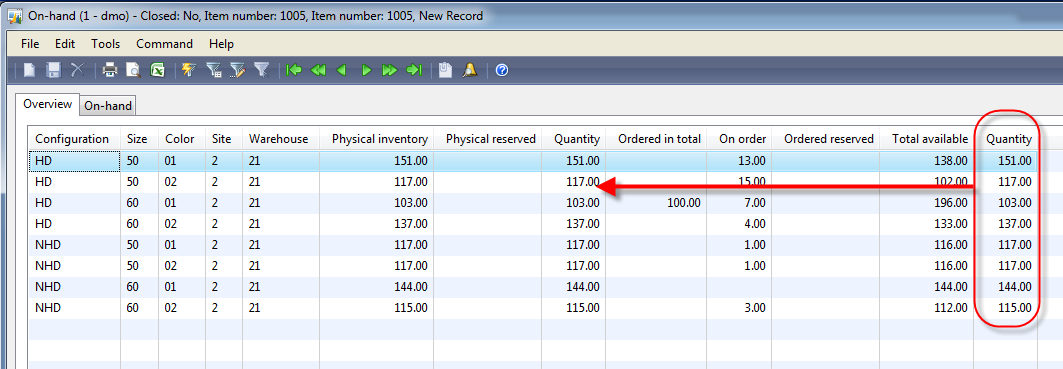
And when I turn off all dimension display except for site and warehouse, the display method is still correct:

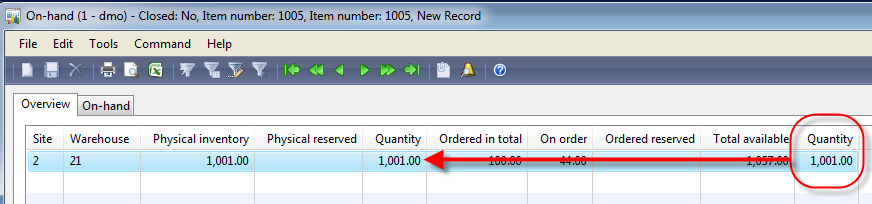
So the gotcha and somewhat undocumented feature here is really that we need to get the InventDim out of the _inventSum passed in (using joinChild), since we need the exactly related record, not the currently select grid record we can get from the InventDim datasource on the form.
// To Pass the lesser than date range in the query ...
query openingbalance(
Query query,
ItemId itemId,
// transdate fromdate,
// transdate todate,
InventDim inventDimCriteria,
InventDimParm inventDimParmCriteria,
InventDimParm inventDimParmGroupBy,
container dimFields = InventDim::dimFieldList()
)
{
QueryBuildDataSource qbsTrans;
QueryBuildDataSource qbsDim;
QueryBuildRange queryRange;
inventtrans inventtrans;
boolean doFindRange;
;
if (!query)
query = new Query();
if (query.dataSourceTable(tablenum(Inventtrans)))
{
qbsTrans = query.dataSourceTable(tablenum(Inventtrans));
qbsTrans.sortClear();
doFindRange = true;
}
else
qbsTrans = query.addDataSource(tablenum(Inventtrans));
if (query.dataSourceTable(tablenum(InventDim)))
{
qbsDim = query.dataSourceTable(tablenum(InventDim));
qbsDim.sortClear();
doFindRange = true;
}
else
qbsDim = qbsTrans.addDataSource(tablenum(InventDim));
qbsDim.joinMode(JoinMode::InnerJoin);
qbsDim.relations(true);
if (inventDimParmCriteria.ItemIdFlag)
{
queryRange = doFindRange ? qbsTrans.findRange(fieldnum(Inventtrans,ItemId)) : null;
if (! queryRange)
queryRange = qbsTrans.addRange(fieldnum(Inventtrans,ItemId));
if (itemId)
queryRange.value(queryValue(itemId));
else
queryRange.value(SysQuery::valueEmptyString());
}
if (inventDimParmGroupBy.ItemIdFlag)
{
qbsTrans.addSortField(fieldnum(Inventtrans,ItemId));
qbsTrans.orderMode(OrderMode::GroupBy);
}
qbsTrans.clearRange(fieldnum(inventtrans,DateFinancial));
qbsTrans.addRange(fieldnum(inventtrans,DateFinancial)).value('..' + queryvalue(todate));
Inventtrans::queryAddSumQty(qbsTrans);
// InventDim::queryDatasourceAddRangeSortFromParms(qbsDim,doFindRange,inventDimCriteria,inventDimParmCriteria,inventDimParmGroupBy,dimFields);
// Inventtrans::queryAddHint(query,inventDimCriteria,inventDimParmCriteria,qbsTrans,qbsDim);
qbsTrans.clearRange(fieldnum(inventtrans,DateFinancial));
return query;
}
query openingbalance(
Query query,
ItemId itemId,
// transdate fromdate,
// transdate todate,
InventDim inventDimCriteria,
InventDimParm inventDimParmCriteria,
InventDimParm inventDimParmGroupBy,
container dimFields = InventDim::dimFieldList()
)
{
QueryBuildDataSource qbsTrans;
QueryBuildDataSource qbsDim;
QueryBuildRange queryRange;
inventtrans inventtrans;
boolean doFindRange;
;
if (!query)
query = new Query();
if (query.dataSourceTable(tablenum(Inventtrans)))
{
qbsTrans = query.dataSourceTable(tablenum(Inventtrans));
qbsTrans.sortClear();
doFindRange = true;
}
else
qbsTrans = query.addDataSource(tablenum(Inventtrans));
if (query.dataSourceTable(tablenum(InventDim)))
{
qbsDim = query.dataSourceTable(tablenum(InventDim));
qbsDim.sortClear();
doFindRange = true;
}
else
qbsDim = qbsTrans.addDataSource(tablenum(InventDim));
qbsDim.joinMode(JoinMode::InnerJoin);
qbsDim.relations(true);
if (inventDimParmCriteria.ItemIdFlag)
{
queryRange = doFindRange ? qbsTrans.findRange(fieldnum(Inventtrans,ItemId)) : null;
if (! queryRange)
queryRange = qbsTrans.addRange(fieldnum(Inventtrans,ItemId));
if (itemId)
queryRange.value(queryValue(itemId));
else
queryRange.value(SysQuery::valueEmptyString());
}
if (inventDimParmGroupBy.ItemIdFlag)
{
qbsTrans.addSortField(fieldnum(Inventtrans,ItemId));
qbsTrans.orderMode(OrderMode::GroupBy);
}
qbsTrans.clearRange(fieldnum(inventtrans,DateFinancial));
qbsTrans.addRange(fieldnum(inventtrans,DateFinancial)).value('..' + queryvalue(todate));
Inventtrans::queryAddSumQty(qbsTrans);
// InventDim::queryDatasourceAddRangeSortFromParms(qbsDim,doFindRange,inventDimCriteria,inventDimParmCriteria,inventDimParmGroupBy,dimFields);
// Inventtrans::queryAddHint(query,inventDimCriteria,inventDimParmCriteria,qbsTrans,qbsDim);
qbsTrans.clearRange(fieldnum(inventtrans,DateFinancial));
return query;
}
Subscribe to:
Comments (Atom)